// app.jsx — 터줏대감 landing page main app

const { useState, useEffect, useRef, useMemo } = React;

// ───────────── KPI 추적 시스템 ─────────────
const KPITracker = {
  sessionId: Date.now() + '-' + Math.random().toString(36).substr(2, 9),
  events: [],
  sectionStates: {}, // 섹션별 상태 저장 (audience 특별 처리용)

  // KPI 이벤트 기록
  track(eventName, data = {}) {
    const event = {
      event: eventName,
      session_id: this.sessionId,
      timestamp: Date.now(),
      url: window.location.href,
      ...data
    };

    this.events.push(event);

    // localStorage에 저장 (브라우저에 누적)
    try {
      const stored = JSON.parse(localStorage.getItem('kpi_events') || '[]');
      stored.push(event);
      // 최근 100개만 유지
      if (stored.length > 100) stored.shift();
      localStorage.setItem('kpi_events', JSON.stringify(stored));
    } catch(e) {}

    // GTM 전송 안 함 - session_summary만 전송
  },

  // 서버 전송 함수 (추후 사용)
  sendToServer(event) {
    // fetch('/api/kpi', {
    //   method: 'POST',
    //   headers: { 'Content-Type': 'application/json' },
    //   body: JSON.stringify(event)
    // }).catch(err => console.error('KPI 전송 실패:', err));
  },

  // 저장된 KPI 데이터 확인
  getEvents() {
    return this.events;
  },

  // 통계 요약
  getSummary() {
    const summary = {
      totalEvents: this.events.length,
      byType: {}
    };
    this.events.forEach(e => {
      summary.byType[e.event] = (summary.byType[e.event] || 0) + 1;
    });
    return summary;
  },

  // 섹션별 정리 (variant 포함)
  getBySection() {
    const sections = {
      hero: [],
      problem: [],
      solution: [],
      preview: [],
      audience: [],
      cta: [] // CTA 별도
    };

    this.events.forEach(e => {
      // 이벤트 이름에서 섹션 추출
      const sectionMatch = e.event.match(/^(hero|problem|solution|preview|audience|cta)/);
      if (sectionMatch) {
        const section = sectionMatch[1];
        sections[section].push(e);
      } else if (e.event.includes('signup') || e.event === 'ab_test_assigned') {
        // signup 관련은 CTA로 분류
        sections.cta.push(e);
      }
    });

    return sections;
  },

  // CTA 퍼널 분석 (variant별 분리)
  getCTAFunnel() {
    const ctaEvents = this.events.filter(e =>
      e.event.includes('cta_') || e.event.includes('signup') || e.event === 'ab_test_assigned'
    );

    const byVariant = {
      '터줏대감': [],
      '방랑객': []
    };

    ctaEvents.forEach(e => {
      if (e.variant) {
        byVariant[e.variant].push(e);
      }
    });

    return {
      all: ctaEvents,
      byVariant: byVariant,
      stats: {
        '터줏대감': {
          assigned: byVariant['터줏대감'].filter(e => e.event === 'ab_test_assigned').length,
          entered: byVariant['터줏대감'].filter(e => e.event === 'cta_enter').length,
          focused: byVariant['터줏대감'].filter(e => e.event === 'cta_email_focus').length,
          submitted: byVariant['터줏대감'].filter(e => e.event === 'signup_submit').length,
          completed: byVariant['터줏대감'].filter(e => e.event === 'signup_complete').length
        },
        '방랑객': {
          assigned: byVariant['방랑객'].filter(e => e.event === 'ab_test_assigned').length,
          entered: byVariant['방랑객'].filter(e => e.event === 'cta_enter').length,
          focused: byVariant['방랑객'].filter(e => e.event === 'cta_email_focus').length,
          submitted: byVariant['방랑객'].filter(e => e.event === 'signup_submit').length,
          completed: byVariant['방랑객'].filter(e => e.event === 'signup_complete').length
        }
      }
    };
  },

  // 섹션별 체류 시간 요약
  getSectionDwellSummary() {
    const dwellEvents = this.events.filter(e => e.event.includes('_dwell'));
    const summary = {};

    dwellEvents.forEach(e => {
      const section = e.section_name;
      if (!summary[section]) {
        summary[section] = {
          total_dwell_time: 0,
          visit_count: 0,
          events: []
        };
      }

      summary[section].total_dwell_time = e.total_dwell_time || e.dwell_time;
      summary[section].visit_count = Math.max(summary[section].visit_count, e.visit_count || 1);
      summary[section].events.push(e);
    });

    return summary;
  },

  // 세션 요약 생성 (GTM 전송용 - FLAT 구조)
  generateSessionSummary() {
    const dwellSummary = this.getSectionDwellSummary();
    const ctaFunnel = this.getCTAFunnel();

    // 이탈 섹션 찾기
    const exitEvents = this.events.filter(e => e.event.includes('_exit'));
    const lastExit = exitEvents[exitEvents.length - 1];

    // CTA 데이터
    const ctaData = ctaFunnel.all.length > 0 ? {
      variant: ctaFunnel.all[0].variant,
      entered: ctaFunnel.stats[ctaFunnel.all[0].variant]?.entered > 0,
      focused: ctaFunnel.stats[ctaFunnel.all[0].variant]?.focused > 0,
      submitted: ctaFunnel.stats[ctaFunnel.all[0].variant]?.submitted > 0,
      completed: ctaFunnel.stats[ctaFunnel.all[0].variant]?.completed > 0,
      time_to_submit: this.events.find(e => e.event === 'signup_submit')?.time_to_submit || null
    } : null;

    // 방문한 섹션들
    const sectionsVisited = Object.keys(dwellSummary);

    // 총 세션 시간
    const totalSessionTime = Object.values(dwellSummary)
      .reduce((sum, s) => sum + (s.total_dwell_time || 0), 0);

    // FLAT 구조로 변환
    const flatSummary = {
      event: 'session_summary',
      session_id: this.sessionId,
      timestamp: Date.now(),

      // 섹션별 데이터 flat하게 펼침
      ...Object.fromEntries(
        Object.entries(dwellSummary).flatMap(([name, data]) => [
          [`${name}_total_dwell`, data.total_dwell_time || 0],
          [`${name}_visit_count`, data.visit_count || 0]
        ])
      ),

      // CTA 데이터 flat하게 펼침
      ...(ctaData ? {
        cta_variant: ctaData.variant,
        cta_entered: ctaData.entered,
        cta_focused: ctaData.focused,
        cta_submitted: ctaData.submitted,
        cta_completed: ctaData.completed,
        cta_time_to_submit: ctaData.time_to_submit
      } : {}),

      // 세션 메타데이터
      total_session_time: totalSessionTime,
      sections_visited_count: sectionsVisited.length,
      sections_visited_list: sectionsVisited.join(','), // 배열 → 문자열
      exit_section: lastExit?.section_name || null,
      reached_cta: sectionsVisited.includes('cta'),
      converted: ctaData?.completed || false
    };

    return flatSummary;
  },

  // GTM에 세션 요약 전송
  sendSessionSummary() {
    const summary = this.generateSessionSummary();

    if (typeof window !== 'undefined' && window.dataLayer) {
      window.dataLayer.push(summary);
    }
  }
};

// 전역에서 접근 가능하게
window.KPITracker = KPITracker;

// ───────────── 세션 요약 전송 안전장치 ─────────────
// 모바일 누락 방지: visibilitychange + beforeunload 이중 방어
let sessionSummarySent = false;

// 1. visibilitychange: 모바일 앱 전환, 탭 전환, 최소화 감지
document.addEventListener('visibilitychange', () => {
  if (document.hidden && !sessionSummarySent) {
    KPITracker.sendSessionSummary();
    sessionSummarySent = true;
  }
});

// 2. beforeunload: 정상적인 페이지 닫기 (Ctrl+W, X버튼, 네비게이션)
window.addEventListener('beforeunload', () => {
  if (!sessionSummarySent) {
    KPITracker.sendSessionSummary();
    sessionSummarySent = true;
  }
});

// ───────────── 섹션별 KPI 추적 훅 ─────────────

// 스크롤 깊이 계산 함수
function getScrollDepth() {
  const scrollTop = window.scrollY;
  const docHeight = document.documentElement.scrollHeight - window.innerHeight;
  return Math.round((scrollTop / docHeight) * 100);
}

// 섹션 체류 시간 & 노출 추적 (재진입 가능 + 누적 시간)
function useSectionTracking(sectionName, options = {}) {
  const ref = useRef(null);
  const enterTimeRef = useRef(null);
  const totalDwellTimeRef = useRef(0); // 누적 체류 시간 (ms)
  const visitCountRef = useRef(0); // 방문 횟수

  useEffect(() => {
    if (!ref.current) return;

    // 섹션 상태를 KPITracker에 저장 (audience 특별 처리용)
    KPITracker.sectionStates[sectionName] = {
      enterTimeRef,
      totalDwellTimeRef,
      visitCountRef
    };

    const observer = new IntersectionObserver(
      (entries) => {
        entries.forEach((entry) => {
          if (entry.isIntersecting) {
            // 섹션 진입 (재진입 포함)
            if (!enterTimeRef.current) {
              const enterTime = Date.now();
              enterTimeRef.current = enterTime;
              visitCountRef.current += 1;

              KPITracker.track(`${sectionName}_enter`, {
                section_name: sectionName,
                enter_time: enterTime,
                scroll_depth: getScrollDepth(),
                visit_count: visitCountRef.current, // 몇 번째 방문인지
                total_dwell_time: Math.round(totalDwellTimeRef.current / 100) / 10 // 이전까지 누적 시간 (초, 소숫점 1자리)
              });
            }
          } else {
            // 섹션 이탈
            if (enterTimeRef.current) {
              const exitTime = Date.now();
              const dwellTime = exitTime - enterTimeRef.current;

              if (dwellTime > 500) { // 0.5초 이상 머문 경우만 기록
                totalDwellTimeRef.current += dwellTime; // 누적

                KPITracker.track(`${sectionName}_dwell`, {
                  section_name: sectionName,
                  enter_time: enterTimeRef.current,
                  exit_time: exitTime,
                  dwell_time: Math.round(dwellTime / 100) / 10, // 이번 체류 시간 (초, 소숫점 1자리)
                  total_dwell_time: Math.round(totalDwellTimeRef.current / 100) / 10, // 총 누적 시간 (초, 소숫점 1자리)
                  visit_count: visitCountRef.current,
                  scroll_depth: getScrollDepth()
                });
              }
              enterTimeRef.current = null;
            }
          }
        });
      },
      { threshold: options.threshold || 0.5 }
    );

    observer.observe(ref.current);

    // 페이지 이탈 시 체류 시간 기록
    const handleBeforeUnload = () => {
      if (enterTimeRef.current) {
        const exitTime = Date.now();
        const dwellTime = exitTime - enterTimeRef.current;
        totalDwellTimeRef.current += dwellTime;

        KPITracker.track(`${sectionName}_exit`, {
          section_name: sectionName,
          enter_time: enterTimeRef.current,
          exit_time: exitTime,
          dwell_time: Math.round(dwellTime / 100) / 10,
          total_dwell_time: Math.round(totalDwellTimeRef.current / 100) / 10,
          visit_count: visitCountRef.current,
          scroll_depth: getScrollDepth()
        });
      }
    };

    window.addEventListener('beforeunload', handleBeforeUnload);

    return () => {
      observer.disconnect();
      window.removeEventListener('beforeunload', handleBeforeUnload);
    };
  }, [sectionName, options.threshold]);

  return ref;
}

// 요소별 노출 추적 (이미지, 카드 등)
function useElementTracking(elementName) {
  const ref = useRef(null);
  const hasTrackedRef = useRef(false);

  useEffect(() => {
    if (!ref.current) return;

    const observer = new IntersectionObserver(
      (entries) => {
        entries.forEach((entry) => {
          if (entry.isIntersecting && !hasTrackedRef.current) {
            KPITracker.track(`element_view`, {
              element: elementName
            });
            hasTrackedRef.current = true;
          }
        });
      },
      { threshold: 0.7 }
    );

    observer.observe(ref.current);
    return () => observer.disconnect();
  }, [elementName]);

  return ref;
}

// ───────────── reveal hook ─────────────
function useReveal() {
  const ref = useRef(null);
  useEffect(() => {
    if (!ref.current) return;
    const el = ref.current;
    const io = new IntersectionObserver(
      (entries) => {
        entries.forEach(e => { if (e.isIntersecting) { el.classList.add("in"); io.unobserve(el); } });
      },
      { threshold: 0.15 }
    );
    io.observe(el);
    return () => io.disconnect();
  }, []);
  return ref;
}

// ───────────── animated counter ─────────────
function useCount(target, duration = 1400, start = false) {
  const [v, setV] = useState(0);
  useEffect(() => {
    if (!start) return;
    const t0 = performance.now();
    let raf;
    const step = (t) => {
      const p = Math.min(1, (t - t0) / duration);
      const eased = 1 - Math.pow(1 - p, 3);
      setV(target * eased);
      if (p < 1) raf = requestAnimationFrame(step);
    };
    raf = requestAnimationFrame(step);
    return () => cancelAnimationFrame(raf);
  }, [target, duration, start]);
  return v;
}

function Counter({ to, duration = 1400, format = (x) => Math.round(x).toString() }) {
  const ref = useRef(null);
  const [start, setStart] = useState(false);
  useEffect(() => {
    if (!ref.current) return;
    const io = new IntersectionObserver(
      (entries) => {
        entries.forEach(e => { if (e.isIntersecting) setStart(true); });
      },
      { threshold: 0.4 }
    );
    io.observe(ref.current);
    return () => io.disconnect();
  }, []);
  const v = useCount(to, duration, start);
  return <span ref={ref} className="tnum">{format(v)}</span>;
}

// ───────────── NAV ─────────────
function Nav({ onCTAClick }) {
  const scrollToSection = (id) => {
    const element = document.getElementById(id);
    if (!element) return;
    const y = element.getBoundingClientRect().top + window.scrollY - 60;
    window.scrollTo({ top: y, behavior: "smooth" });
  };

  return (
    <nav className="nav">
      <div className="nav-inner">
        <div className="brand" onClick={() => window.location.reload()} style={{ cursor: 'pointer' }}>
          <span className="brand-mark"></span>
          <span>터줏대감</span>
        </div>
        <div style={{ display: 'flex', alignItems: 'center', gap: 24 }}>
          <div className="nav-links">
            <a onClick={(e) => { e.preventDefault(); scrollToSection('problem'); }} style={{ cursor: 'pointer' }}>문제</a>
            <a onClick={(e) => { e.preventDefault(); scrollToSection('how'); }} style={{ cursor: 'pointer' }}>작동 방식</a>
            <a onClick={(e) => { e.preventDefault(); scrollToSection('preview'); }} style={{ cursor: 'pointer' }}>점령</a>
          </div>
          <button className="nav-cta" onClick={onCTAClick}>
            사전 등록 <span style={{ fontSize: 11 }}>↓</span>
          </button>
        </div>
      </div>
    </nav>
  );
}

// ───────────── HERO ─────────────
function Hero({ onCTAClick }) {
  const headRef = useReveal();
  return (
    <section className="hero">
      <div className="wrap">
        <div className="hero-grid">
          <div ref={headRef} className="reveal">
            <h1>
              광고 리뷰에<br/>
              <span className="strike">속지 마세요.</span><br/>
              <span className="accent">단골</span>이 증명합니다.
            </h1>

            <p className="lede hero-lede">
              방문 횟수와 사용 금액으로 점령자를 결정합니다.
              가장 자주 가는 사람의 리뷰가 대표가 되는 — 구조 자체가 신뢰를 보증하는 맛집 플랫폼.
            </p>

            <div className="hero-cta-row">
              <button className="btn btn-primary" onClick={onCTAClick}>
                사전 등록하기 <span className="btn-arrow">→</span>
              </button>
              <a href="#how" className="btn btn-ghost">
                어떻게 작동하나요?
              </a>
            </div>

            <div className="hero-meta">
              <div className="hero-meta-item">
                <span className="num"><Counter to={2847} format={(x) => Math.round(x).toLocaleString()} /></span>
                <span className="lbl">사전 등록자</span>
              </div>
              <div className="hero-meta-item">
                <span className="num"><Counter to={184} format={(x) => Math.round(x)} /></span>
                <span className="lbl">파일럿 매장</span>
              </div>
              <div className="hero-meta-item">
                <span className="num">서울<span style={{ fontSize: 14, color: "var(--ink-mute)", marginLeft: 4 }}>·</span>4구</span>
                <span className="lbl">서비스 지역</span>
              </div>
            </div>
          </div>

          <div className="hero-map reveal" ref={useReveal()}>
            <div className="map-tl">SEOUL · WEST</div>
            <div className="map-tr">37°33′N · 126°54′E</div>
            <div className="hero-map-corners"><i></i><i></i></div>
            <MapVisual />
          </div>
        </div>
      </div>
    </section>
  );
}

// ───────────── PROBLEM ─────────────
function Problem() {
  const ref = useReveal();
  const trackingRef = useSectionTracking('problem', { threshold: 0.3 });

  return (
    <section className="section problem" id="problem" ref={trackingRef}>
      <div className="wrap">
        <div ref={ref} className="reveal">
          <h2 className="problem-headline" style={{ marginTop: 24, maxWidth: "16ch" }}>
            기존리뷰<br/>
            <em>믿을 수 있으세요?</em>
          </h2>
          <p className="lede" style={{ marginTop: 32, maxWidth: "56ch" }}>
            네x버 블로그, 인x타 맛집 계정.<br></br>
            모두가 알면서도, 모두가 어쩔수 없었습니다.
          </p>

          <div className="proof-grid">
            <div className="proof-cell">
              <div className="proof-num"><Counter to={94.1} format={(x) => Math.round(x)} /><span className="unit">%</span></div>
              <div className="proof-label">
                "블로그(네x버, 다x), SNS 로 찾아갔을때 실망했다"고 답한 10-50대 비율
              </div>
              <div className="proof-source">매경헬스 x 식신 · n=1204 · 2021</div>
            </div>
            <div className="proof-cell">
              <div className="proof-num"><Counter to={2.21} duration={1800} format={(x) => x.toFixed(1)} /><span className="unit">건</span></div>
              <div className="proof-label">
                맛집 한 곳을 결정하기 위해 평균적으로 비교 검색하는 횟수
              </div>
              <div className="proof-source">한국인지과학회</div>
            </div>
            <div className="proof-cell">
              <div className="proof-num"><Counter to={1} format={(x) => Math.round(x)} />위</div>
              <div className="proof-label">
                "지인 추천"이 여전히 가장 신뢰하는 맛집 정보 채널
              </div>
              <div className="proof-source">한국리서치 정기조사 · n=1000 · 2021</div>
            </div>
          </div>

          {/* 실제 광고 리뷰 예시 이미지 */}
          <div className="ad-review-examples" style={{ marginTop: 64 }}>
            <h3 style={{ fontSize: 'clamp(20px, 2vw, 28px)', marginBottom: 32, color: 'var(--paper)' }}>
              실제 광고 리뷰
            </h3>

            {/* 2개 이미지를 한 행에 배치 */}
            <div style={{
              display: 'grid',
              gridTemplateColumns: 'repeat(2, 1fr)',
              gap: '20px',
              maxWidth: '800px',
              margin: '0 auto'
            }}>
              {/* 광고 리뷰 이미지 1 */}
              <div style={{
                position: 'relative',
                borderRadius: '8px',
                overflow: 'hidden',
                lineHeight: 0
              }}>
                {/* ADS 뱃지 */}
                <div style={{
                  position: 'absolute',
                  top: '50%',
                  left: '50%',
                  transform: 'translate(-50%, -50%)',
                  background: 'var(--flag)',
                  color: 'var(--paper)',
                  padding: '12px 28px',
                  borderRadius: '6px',
                  fontSize: '20px',
                  fontWeight: '700',
                  fontFamily: 'var(--font-mono)',
                  letterSpacing: '0.12em',
                  zIndex: 10,
                  boxShadow: '0 4px 16px rgba(0,0,0,0.5)'
                }}>
                  ADS
                </div>
                <img src="src/review1.png" alt="광고 리뷰 예시 1" style={{ width: '100%', display: 'block' }} />
              </div>

              {/* 광고 리뷰 이미지 2 */}
              <div style={{
                position: 'relative',
                borderRadius: '8px',
                overflow: 'hidden',
                lineHeight: 0
              }}>
                {/* ADS 뱃지 */}
                <div style={{
                  position: 'absolute',
                  top: '50%',
                  left: '50%',
                  transform: 'translate(-50%, -50%)',
                  background: 'var(--flag)',
                  color: 'var(--paper)',
                  padding: '12px 28px',
                  borderRadius: '6px',
                  fontSize: '20px',
                  fontWeight: '700',
                  fontFamily: 'var(--font-mono)',
                  letterSpacing: '0.12em',
                  zIndex: 10,
                  boxShadow: '0 4px 16px rgba(0,0,0,0.5)'
                }}>
                  ADS
                </div>
                <img src="src/review2.png" alt="광고 리뷰 예시 2" style={{ width: '100%', display: 'block' }} />
              </div>
            </div>
          </div>
        </div>
      </div>
    </section>
  );
}

// ───────────── SOLUTION (How it works) ─────────────
function StepIllu({ kind }) {
  if (kind === "visit") {
    return (
      <svg viewBox="0 0 120 110" width="120" height="110">
        <rect x="2" y="2" width="116" height="106" rx="3" fill="none" stroke="#161310" strokeWidth="0.7" strokeDasharray="3 2" opacity="0.4"/>
        {/* district outline */}
        <path d="M 18 24 Q 32 16 50 22 L 64 36 Q 60 54 46 60 L 28 56 Q 16 44 18 24 Z" fill="#E8E2D5" stroke="#8C8378" strokeWidth="0.5"/>
        <path d="M 64 36 L 86 28 Q 100 38 96 56 L 80 70 L 64 64 Z" fill="#DDD5C2" stroke="#8C8378" strokeWidth="0.5"/>
        <path d="M 28 60 L 60 64 L 76 80 Q 64 92 44 88 L 24 78 Z" fill="#E8E2D5" stroke="#8C8378" strokeWidth="0.5"/>
        {/* gps pulse */}
        <circle cx="48" cy="46" r="14" fill="none" stroke="#C13A2C" strokeWidth="0.8" opacity="0.4">
          <animate attributeName="r" values="6;18;6" dur="2.4s" repeatCount="indefinite"/>
          <animate attributeName="opacity" values="0.6;0;0.6" dur="2.4s" repeatCount="indefinite"/>
        </circle>
        <circle cx="48" cy="46" r="3.5" fill="#C13A2C"/>
        <circle cx="48" cy="46" r="1.5" fill="#fff"/>
        {/* receipt */}
        <g transform="translate(72, 60)">
          <path d="M 0 0 L 22 0 L 22 28 L 19 26 L 16 28 L 13 26 L 10 28 L 7 26 L 4 28 L 0 26 Z"
                fill="#fff" stroke="#161310" strokeWidth="0.4"/>
          <line x1="3" y1="5" x2="19" y2="5" stroke="#8C8378" strokeWidth="0.4"/>
          <line x1="3" y1="9" x2="14" y2="9" stroke="#8C8378" strokeWidth="0.4"/>
          <line x1="3" y1="13" x2="17" y2="13" stroke="#8C8378" strokeWidth="0.4"/>
          <line x1="3" y1="18" x2="19" y2="18" stroke="#161310" strokeWidth="0.6"/>
          <text x="11" y="23" fontSize="3.2" textAnchor="middle" fontFamily="IBM Plex Mono, monospace" fontWeight="600">₩14,000</text>
        </g>
      </svg>
    );
  }
  if (kind === "stack") {
    return (
      <svg viewBox="0 0 120 110" width="120" height="110">
        {/* points stacking visualization */}
        <g transform="translate(20, 90)">
          <rect x="0" y="-12" width="14" height="12" fill="#DDD5C2" stroke="#161310" strokeWidth="0.4"/>
          <rect x="0" y="-26" width="14" height="14" fill="#C13A2C" opacity="0.3" stroke="#161310" strokeWidth="0.4"/>
          <rect x="0" y="-44" width="14" height="18" fill="#C13A2C" opacity="0.55" stroke="#161310" strokeWidth="0.4"/>
          <rect x="0" y="-70" width="14" height="26" fill="#C13A2C" stroke="#161310" strokeWidth="0.4"/>
          <text x="7" y="6" fontSize="3" textAnchor="middle" fontFamily="IBM Plex Mono, monospace" fill="#4A4239">@me</text>
          <text x="7" y="-78" fontSize="3" textAnchor="middle" fontFamily="IBM Plex Mono, monospace" fontWeight="600" fill="#161310">9,842P</text>
        </g>
        <g transform="translate(46, 90)">
          <rect x="0" y="-10" width="14" height="10" fill="#DDD5C2" stroke="#161310" strokeWidth="0.4"/>
          <rect x="0" y="-22" width="14" height="12" fill="#DDD5C2" stroke="#161310" strokeWidth="0.4"/>
          <rect x="0" y="-44" width="14" height="22" fill="#8C8378" opacity="0.4" stroke="#161310" strokeWidth="0.4"/>
          <text x="7" y="6" fontSize="3" textAnchor="middle" fontFamily="IBM Plex Mono, monospace" fill="#4A4239">02</text>
        </g>
        <g transform="translate(72, 90)">
          <rect x="0" y="-8" width="14" height="8" fill="#DDD5C2" stroke="#161310" strokeWidth="0.4"/>
          <rect x="0" y="-22" width="14" height="14" fill="#8C8378" opacity="0.3" stroke="#161310" strokeWidth="0.4"/>
          <text x="7" y="6" fontSize="3" textAnchor="middle" fontFamily="IBM Plex Mono, monospace" fill="#4A4239">03</text>
        </g>
        <g transform="translate(98, 90)">
          <rect x="0" y="-6" width="14" height="6" fill="#DDD5C2" stroke="#161310" strokeWidth="0.4"/>
          <text x="7" y="6" fontSize="3" textAnchor="middle" fontFamily="IBM Plex Mono, monospace" fill="#4A4239">04</text>
        </g>
        {/* axis */}
        <line x1="14" y1="91" x2="116" y2="91" stroke="#161310" strokeWidth="0.5"/>
      </svg>
    );
  }
  // flag planted
  return (
    <svg viewBox="0 0 120 110" width="120" height="110">
      {/* district */}
      <path d="M 18 30 Q 42 18 72 24 Q 100 36 96 64 Q 86 90 56 92 Q 22 86 14 60 Z"
            fill="#E8E2D5" stroke="#8C8378" strokeWidth="0.6"/>
      <path d="M 28 36 Q 48 28 68 32 M 36 70 Q 60 76 84 70" stroke="#8C8378" strokeWidth="0.3" fill="none" opacity="0.5"/>
      {/* big flag */}
      <g transform="translate(60, 56)">
        <line x1="0" y1="6" x2="0" y2="-32" stroke="#161310" strokeWidth="1.4"/>
        <path d="M 0 -32 L 26 -28 L 22 -22 L 26 -16 L 0 -20 Z" fill="#C13A2C" stroke="#161310" strokeWidth="0.5"/>
        <text x="3" y="-25" fontSize="3.2" fontFamily="IBM Plex Mono, monospace" fontWeight="600" fill="#fff">@me</text>
        <circle r="3" fill="#161310"/>
        <circle r="1" fill="#fff"/>
      </g>
      {/* shockwave */}
      <circle cx="60" cy="56" r="20" fill="none" stroke="#C13A2C" strokeWidth="0.6" opacity="0.5">
        <animate attributeName="r" values="14;30;14" dur="3s" repeatCount="indefinite"/>
        <animate attributeName="opacity" values="0.6;0;0.6" dur="3s" repeatCount="indefinite"/>
      </circle>
    </svg>
  );
}

function Solution() {
  const ref = useReveal();
  const trackingRef = useSectionTracking('solution', { threshold: 0.3 });

  return (
    <section className="section" id="how" ref={trackingRef}>
      <div className="wrap">
        <div className="section-head" ref={ref}>
          <div>
            <h2>
              광고 말고 <span className="serif">매장을</span> <em style={{ fontStyle: "normal", color: "var(--flag)" }}>점령</em>한<br/>
              <em style={{ fontStyle: "normal", color: "var(--flag)" }}>터줏대감</em>에게 들으세요.<br></br>
            </h2>
            <p className="lede" style={{ marginTop: 24 }}>
              매장 방문 인증과 결제 인증으로, 점수를 계산하여 터줏대감이 등장합니다. <br></br>
              무분별한 리뷰 노출이 아닌 인증된 사용자, <br></br> 즉 <strong style={{ color: "var(--ink)" }}>터줏대감의 리뷰를 우선 노출</strong>합니다.
            </p>
          </div>
        </div>

        <div className="steps-grid">
          <div className="step-cell">
            <div className="step-num">STEP 01 · 인증</div>
            <div className="step-illu"><StepIllu kind="visit" /></div>
            <div className="step-title">방문하고,<br/>영수증을 찍습니다</div>
            <p className="step-body">
              위치 기반으로 매장 방문이 인증됩니다. 결제 영수증을 찍으면 사용 금액까지 인증됩니다.
            </p>
          </div>
          <div className="step-cell">
            <div className="step-num">STEP 02 · 누적</div>
            <div className="step-illu"><StepIllu kind="stack" /></div>
            <div className="step-title">방문과 결제를 반복할수록<br/>점수가 쌓입니다</div>
            <p className="step-body">
              방문 횟수, 사용 금액, 시간 가중치로 점수가 계산됩니다.
              포인트로 다른 터줏대감들과 경쟁하며, 터줏대감만의 보상이 주어집니다.
            </p>
          </div>
          <div className="step-cell">
            <div className="step-num">STEP 03 · 점령</div>
            <div className="step-illu"><StepIllu kind="flag" /></div>
            <div className="step-title">순위권에 오르면<br/>매장을 점령합니다</div>
            <p className="step-body">
              매장 점령시, 매장의 터줏대감으로서 여러분들의 리뷰가
              최상단에 노출됩니다. 실시간 포인트로 순위가 변동되며, 누구든지 터줏대감이 될 수 있습니다.
            </p>
          </div>
        </div>
      </div>
    </section>
  );
}

// ───────────── PRODUCT PREVIEW ─────────────
function ProductPreview() {
  const ref = useReveal();
  const trackingRef = useSectionTracking('preview', { threshold: 0.3 });
  const previewImageRef = useElementTracking('preview_image');

  return (
    <section className="section" id="preview" style={{ background: "var(--paper-2)" }} ref={trackingRef}>
      <div className="wrap">
        <div className="section-head" ref={ref}>
          <div>
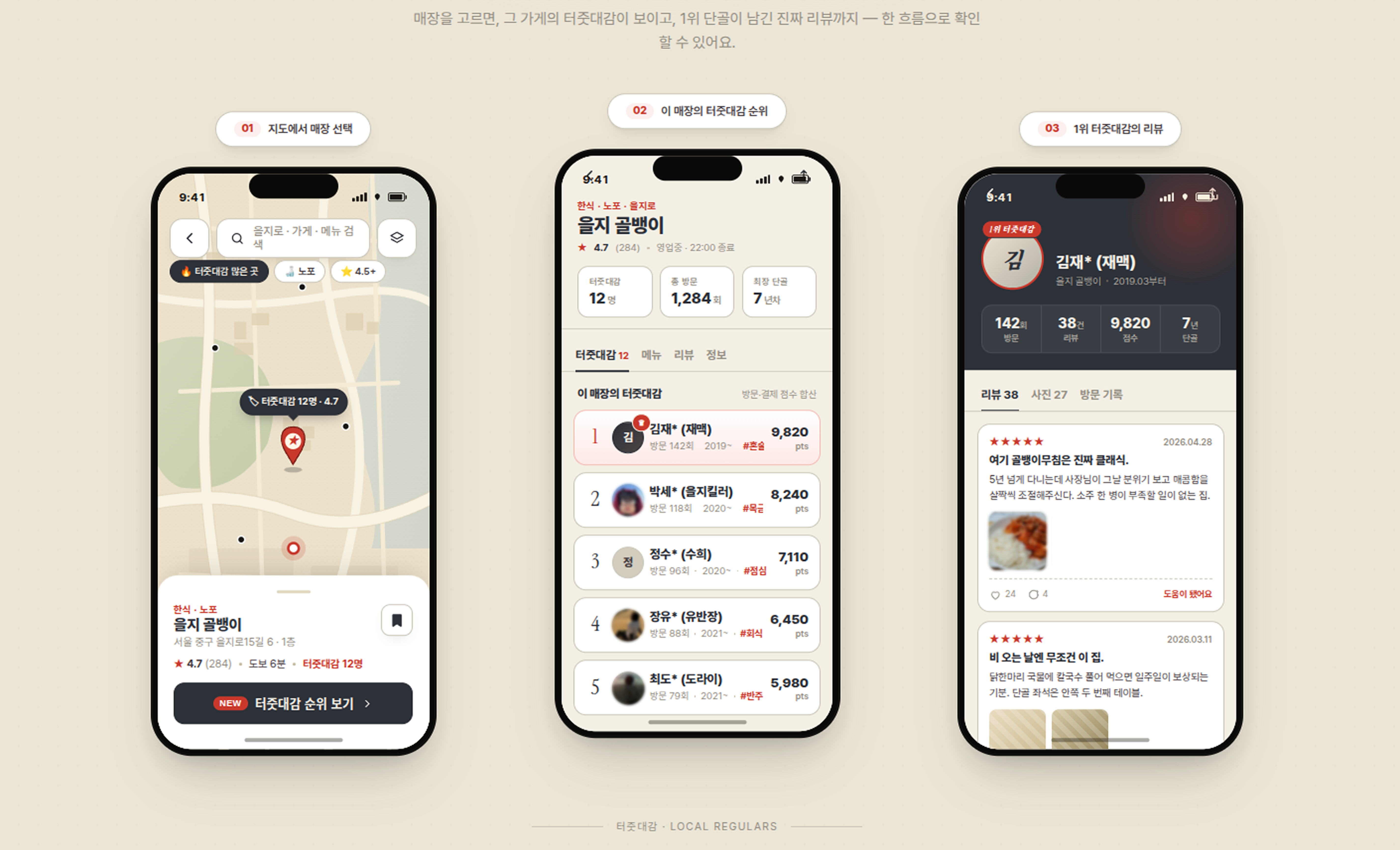
            <h2>이런 모습입니다.</h2>
            <p className="lede" style={{ marginTop: 24 }}>
              <strong style={{ color: "var(--ink)" }}>터줏대감들</strong>이 먼저 보입니다.
              그 사람이 누구이고, 몇 번 갔고, 얼마 썼는지 — 신뢰의 근거가 모두 공개됩니다.
            </p>
          </div>
        </div>

        {/* 이미지 플레이스홀더 */}
        <div ref={previewImageRef} style={{
          width: '100%',
          aspectRatio: '16 / 9',
          background: 'var(--paper)',
          border: '1px solid var(--line)',
          borderRadius: '4px',
          display: 'flex',
          alignItems: 'center',
          justifyContent: 'center',
          boxShadow: '0 1px 0 rgba(255,255,255,0.6) inset, 0 20px 60px -20px rgba(22, 19, 16, 0.18)'
        }}>
          <div style={{
            textAlign: 'center',
            color: 'var(--ink-mute)',
            fontFamily: 'var(--font-mono)',
            fontSize: 13
          }}>
            <img src="src/real.png" alt="광고 리뷰 예시 2" style={{ width: '100%', display: 'block' }} />
          </div>
        </div>
      </div>
    </section>
  );
}

// ───────────── AUDIENCE ─────────────
function Audience() {
  const ref = useReveal();
  const trackingRef = useSectionTracking('audience', { threshold: 0.3 });
  const sectionRef = useRef(null);

  // Audience 특별 처리: 화면 위로 완전히 사라지면 dwell 강제 기록
  useEffect(() => {
    const handleScroll = () => {
      if (!sectionRef.current) return;

      const rect = sectionRef.current.getBoundingClientRect();
      const audienceState = KPITracker.sectionStates['audience'];

      // 섹션이 화면 위로 완전히 사라짐
      if (rect.bottom < 0 && audienceState?.enterTimeRef.current) {
        const exitTime = Date.now();
        const dwellTime = exitTime - audienceState.enterTimeRef.current;

        if (dwellTime > 500) {
          audienceState.totalDwellTimeRef.current += dwellTime;

          KPITracker.track('audience_dwell', {
            section_name: 'audience',
            enter_time: audienceState.enterTimeRef.current,
            exit_time: exitTime,
            dwell_time: Math.round(dwellTime / 100) / 10,
            total_dwell_time: Math.round(audienceState.totalDwellTimeRef.current / 100) / 10,
            visit_count: audienceState.visitCountRef.current,
            scroll_depth: getScrollDepth(),
            trigger: 'scroll_above' // 스크롤로 인한 강제 기록
          });

          audienceState.enterTimeRef.current = null;
        }
      }
    };

    window.addEventListener('scroll', handleScroll);
    return () => window.removeEventListener('scroll', handleScroll);
  }, []);

  return (
    <section className="section" id="audience" ref={(el) => { trackingRef.current = el; sectionRef.current = el; }}>
      <div className="wrap">
        <div className="section-head" ref={ref}>
          <div>
            <h2>터줏대감, 그리고 방랑객</h2>
            <p className="lede" style={{ marginTop: 24 }}>
              처음가보는 매장은 누구나 방랑객, 익숙한 매장은 누구나 터줏대감으로서 활동합니다.
            </p>
          </div>
        </div>

        <div className="audience-grid">
          <div className="audience-cell evangelist">
            <div className="audience-tag">터줏대감</div>
            <h3 className="audience-title">"내가 여기 잘 안다니까?<br/>진짜야!!"</h3>
            <p className="audience-quote">
              내가 이 구역 터줏대감 - 점령포인트 순위권에 들어, 터줏대감이 되면 타매장 방랑객으로서 더 많은 정보를 볼 수 있게 포인트가 지급됩니다.
            </p>
            <div className="audience-payoff">
              → 점령 순위권 = 포인트 = 더 많은 맛집 정보 접근권
            </div>
          </div>

          <div className="audience-cell seeker">
            <div className="audience-tag">방랑객</div>
            <h3 className="audience-title">"죄다 광고. 어떡해..?<br/>너가 여기 터줏대감 이구나!"</h3>
            <p className="audience-quote">
              여기 처음인데... 뭐 먹어야 해요? - 매장의 터줏대감들이 알려주는 정보를 얻고, 원한다면 포인트를 소비하여 더 많은 정보를 얻습니다.
            </p>
            <div className="audience-payoff">
              → 검색 → 터줏대감 정보 입수 → 이게 맛있구나!
            </div>
          </div>
        </div>
      </div>
    </section>
  );
}

// ───────────── CTA ─────────────
function CTA({ ctaRef }) {
  const ref = useReveal();
  const trackingRef = useRef(null);

  // CTA 퍼널 추적 시간
  const ctaEnterTimeRef = useRef(null);
  const emailFocusTimeRef = useRef(null);
  const hasEnteredRef = useRef(false);

  // A/B 테스트: 터줏대감 vs 방랑객
  const [userType] = useState(() => {
    const type = Math.random() < 0.5 ? '터줏대감' : '방랑객';
    // A/B 테스트 버전 기록
    KPITracker.track('ab_test_assigned', {
      variant: type,
      test_name: 'signup_user_type'
    });
    return type;
  });

  const [contact, setContact] = useState("");
  const [restaurant, setRestaurant] = useState("");
  const [submitted, setSubmitted] = useState(false);
  const [waitlistNum, setWaitlistNum] = useState(null);

  // CTA 섹션 진입 감지 (IntersectionObserver 사용)
  useEffect(() => {
    if (!trackingRef.current) return;

    const observer = new IntersectionObserver(
      (entries) => {
        entries.forEach((entry) => {
          if (entry.isIntersecting && !hasEnteredRef.current) {
            const enterTime = Date.now();
            ctaEnterTimeRef.current = enterTime;
            hasEnteredRef.current = true;

            // CTA 진입 시 audience_dwell 강제 기록
            const audienceState = KPITracker.sectionStates['audience'];
            if (audienceState?.enterTimeRef.current) {
              const exitTime = Date.now();
              const dwellTime = exitTime - audienceState.enterTimeRef.current;

              if (dwellTime > 500) {
                audienceState.totalDwellTimeRef.current += dwellTime;

                KPITracker.track('audience_dwell', {
                  section_name: 'audience',
                  enter_time: audienceState.enterTimeRef.current,
                  exit_time: exitTime,
                  dwell_time: Math.round(dwellTime / 100) / 10,
                  total_dwell_time: Math.round(audienceState.totalDwellTimeRef.current / 100) / 10,
                  visit_count: audienceState.visitCountRef.current,
                  scroll_depth: getScrollDepth(),
                  trigger: 'cta_enter' // CTA 진입으로 인한 강제 기록
                });

                audienceState.enterTimeRef.current = null;
              }
            }

            KPITracker.track('cta_enter', {
              cta_enter_time: enterTime,
              variant: userType,
              scroll_depth: getScrollDepth()
            });
          }
        });
      },
      { threshold: 0.3 }
    );

    observer.observe(trackingRef.current);
    return () => observer.disconnect();
  }, [userType]);

  // 폼 필드 상호작용 추적
  const handleEmailFocus = () => {
    if (!emailFocusTimeRef.current) {
      const focusTime = Date.now();
      emailFocusTimeRef.current = focusTime;

      const timeToFocus = ctaEnterTimeRef.current
        ? Math.round((focusTime - ctaEnterTimeRef.current) / 100) / 10
        : null;

      KPITracker.track('cta_email_focus', {
        variant: userType,
        email_focus_time: focusTime,
        time_to_focus: timeToFocus // 초 단위, 소숫점 1자리
      });
    }
  };

  const handleEmailChange = (e) => {
    setContact(e.target.value);
  };

  const handleRestaurantFocus = () => {
    KPITracker.track('cta_restaurant_focus', {
      variant: userType
    });
  };

  const handleSubmit = (e) => {
    e?.preventDefault?.();
    if (!contact.trim()) return;

    const submitTime = Date.now();
    const timeToSubmit = emailFocusTimeRef.current
      ? Math.round((submitTime - emailFocusTimeRef.current) / 100) / 10
      : null;

    const num = 2848 + Math.floor(Math.random() * 5);
    const emailDomain = contact.includes('@') ? contact.split('@')[1] : 'invalid';

    // 제출 추적
    KPITracker.track('signup_submit', {
      variant: userType,
      submit_time: submitTime,
      time_to_submit: timeToSubmit, // 초 단위, 소숫점 1자리
      has_restaurant: !!restaurant,
      email_domain: emailDomain,
      waitlist_number: num
    });

    setSubmitted(true);
    setWaitlistNum(num);

    // 최종 전환 완료 추적
    KPITracker.track('signup_complete', {
      variant: userType,
      email: contact,
      restaurant: restaurant || null,
      waitlist_number: num,
      has_restaurant: !!restaurant
    });
  };

  return (
    <section className="section cta" id="signup" ref={ctaRef}>
      <div className="cta-bg"></div>
      <div className="wrap" ref={trackingRef}>
        <div ref={ref} className="reveal">
          {userType === '터줏대감' ? (
            // 터줏대감 버전
            <>
              <h2 className="cta-headline">
                원조 <span className="accent">터줏대감</span>이<br></br>
                되어보세요.
              </h2>
              <p className="cta-sub">
                내가 제일 자주 가는 단골집을 점령하고,<br/>
                <strong style={{ color: "var(--paper)" }}>터줏대감으로서 포인트를 획득</strong>하세요.
              </p>

              {!submitted ? (
                <form className="cta-form" onSubmit={handleSubmit}>
                  <div className="cta-input-row">
                    <input
                      type="email"
                      placeholder="이메일 주소"
                      value={contact}
                      onFocus={handleEmailFocus}
                      onChange={handleEmailChange}
                    />
                    <button type="submit" disabled={!contact.trim()}>
                      터줏대감 등록 →
                    </button>
                  </div>
                </form>
              ) : (
                <div className="cta-success">
                  {/* <div className="num tnum">#{waitlistNum?.toLocaleString()}</div> */}
                  <h3 style={{ color: "var(--paper)", fontSize: 24, marginBottom: 8 }}>터줏대감 대기 명단에 합류했습니다.</h3>
                  <p style={{ color: "rgba(242,238,230,0.7)", fontSize: 15 }}>
                    알파 오픈 시점에 <span className="mono" style={{ color: "var(--paper)" }}>{contact}</span>으로 안내드립니다.
                    {restaurant && <> "<strong>{restaurant}</strong>"는 우선 입점 검토 매장 리스트에 추가되었습니다.</>}
                  </p>
                </div>
              )}
            </>
          ) : (
            // 방랑객 버전
            <>
              <h2 className="cta-headline">
                믿을 수 있는 <span className="accent">맛집 정보</span>,<br></br>
                이제 찾으세요.
              </h2>
              <p className="cta-sub">
                광고가 아닌, 진짜 터줏대감이 알려주는 맛집.<br/>
                <strong style={{ color: "var(--paper)" }}>방랑객으로서 신뢰할 수 있는 리뷰</strong>를 확인하세요.
              </p>

              {!submitted ? (
                <form className="cta-form" onSubmit={handleSubmit}>
                  <div className="cta-input-row">
                    <input
                      type="email"
                      placeholder="이메일 주소"
                      value={contact}
                      onFocus={handleEmailFocus}
                      onChange={handleEmailChange}
                    />
                    <button type="submit" disabled={!contact.trim()}>
                      방랑객 등록 →
                    </button>
                  </div>
                </form>
              ) : (
                <div className="cta-success">
                  {/* <div className="num tnum">#{waitlistNum?.toLocaleString()}</div> */}
                  <h3 style={{ color: "var(--paper)", fontSize: 24, marginBottom: 8 }}>방랑객 대기 명단에 합류했습니다.</h3>
                  <p style={{ color: "rgba(242,238,230,0.7)", fontSize: 15 }}>
                    알파 오픈 시점에 <span className="mono" style={{ color: "var(--paper)" }}>{contact}</span>으로 안내드립니다.
                  </p>
                </div>
              )}
            </>
          )}
        </div>
      </div>
    </section>
  );
}

// ───────────── TWEAKS PANEL ─────────────
const TWEAK_DEFAULTS = /*EDITMODE-BEGIN*/{
  "theme": "newsprint",
  "headlineMode": "default",
  "fontSize": 17,
  "showProblemSection": true
}/*EDITMODE-END*/;

const HEADLINES = {
  default: {
    pre: <span style={{ fontSize: '0.70em' }}>누가봐도 광고,</span>,
    strike: "아시잖아요.",
    accent: "터줏대감",
    rest: <><span style={{ fontSize: '0.70em' }}>이 <br/>이제는 증명합니다.</span></>,
  },
  declarative: {
    pre: "단골이 인정한 맛집,",
    strike: "광고가 아닙니다.",
    accent: "터줏대감",
    rest: "에서 시작합니다.",
  },
  question: {
    pre: "이 리뷰,",
    strike: "믿어도 됩니까?",
    accent: "단골",
    rest: "이 답합니다.",
  },
  manifesto: {
    pre: "맛집은",
    strike: "광고로 만들 수 없다.",
    accent: "단골",
    rest: "만이 증명할 수 있다.",
  },
};

function Hero2({ onCTAClick, headlineMode }) {
  const headRef = useReveal();
  const mapRef = useReveal();
  const trackingRef = useSectionTracking('hero', { threshold: 0.3 });
  const h = HEADLINES[headlineMode] || HEADLINES.default;

  // Hero 섹션 후킹 KPI 추적
  useEffect(() => {
    const pageEnterTime = Date.now();
    let hasScrolled = false;
    let hasClicked = false;

    // 페이지 진입 기록
    KPITracker.track('page_view', {
      referrer: document.referrer
    });

    // 첫 스크롤 추적
    const handleScroll = () => {
      if (!hasScrolled && window.scrollY > 100) {
        hasScrolled = true;
        const timeToScroll = Date.now() - pageEnterTime;
        KPITracker.track('first_scroll', {
          timeToScroll: Math.round(timeToScroll / 100) / 10 // 초 단위, 소숫점 1자리
        });
      }
    };

    // 5초 이내 이탈 감지
    const bounceTimer = setTimeout(() => {
      if (!hasScrolled && !hasClicked) {
        KPITracker.track('early_bounce', {
          bounceTime: '5s'
        });
      }
    }, 5000);

    window.addEventListener('scroll', handleScroll);

    return () => {
      window.removeEventListener('scroll', handleScroll);
      clearTimeout(bounceTimer);
    };
  }, []);

  const handleCTAClick = () => {
    KPITracker.track('hero_cta_click', {
      cta: 'primary',
      label: '사전 등록하기'
    });
    onCTAClick();
  };

  const handleLearnMoreClick = (e) => {
    KPITracker.track('hero_learn_more_click', {
      cta: 'secondary',
      label: '어떻게 작동하나요'
    });
  };

  return (
    <section className="hero" ref={trackingRef}>
      <div className="wrap">
        <div className="hero-grid">
          <div ref={headRef} className="reveal">
            <h1>
              {h.pre}<br/>
              <span className="strike">{h.strike}</span><br/>
              <span className="accent">{h.accent}</span>{h.rest}
            </h1>

            <p className="lede hero-lede">
              구조적 신뢰를 보증하는 맛집 리뷰 플랫폼.<br></br>
              터줏대감이 들려주는 이야기 들어보실래요?
            </p>

            <div className="hero-cta-row">
              {/* <button className="btn btn-primary" onClick={handleCTAClick}>
                사전 등록하기 <span className="btn-arrow">→</span>
              </button>
              <a href="#how" className="btn btn-ghost" onClick={handleLearnMoreClick}>
                어떻게 작동하나요?
              </a> */}
            </div>
          </div>

          {/* Hero 이미지 */}
          <div className="hero-map reveal" ref={mapRef} style={{
            overflow: 'hidden',
            position: 'relative',
            aspectRatio: '1 / 1.1'
          }}>
            {/* ADS 뱃지 */}
            <div style={{
              position: 'absolute',
              top: '50%',
              left: '50%',
              transform: 'translate(-50%, -50%)',
              background: 'var(--flag)',
              color: 'var(--paper)',
              padding: '12px 28px',
              borderRadius: '6px',
              fontSize: '20px',
              fontWeight: '700',
              fontFamily: 'var(--font-mono)',
              letterSpacing: '0.12em',
              zIndex: 10,
              boxShadow: '0 4px 16px rgba(0,0,0,0.5)'
            }}>
              ADS
            </div>
            <img src="src/hero.png" alt="터줏대감" style={{ width: '100%', height: '100%', objectFit: 'cover', display: 'block' }} />
          </div>
        </div>
      </div>
    </section>
  );
}

// ───────────── APP ─────────────
function App() {
  const [t, setTweak] = useTweaks(TWEAK_DEFAULTS);
  const ctaRef = useRef(null);

  useEffect(() => {
    document.body.className = `theme-${t.theme || "newsprint"}`;
    document.body.style.fontSize = (t.fontSize || 17) + "px";
  }, [t.theme, t.fontSize]);

  const scrollToCTA = () => {
    ctaRef.current?.scrollIntoView?.({ behavior: "smooth", block: "start" });
  };

  // override scrollIntoView prohibition: per system prompt warning, use scrollTo instead
  const goCTA = () => {
    if (!ctaRef.current) return;
    const y = ctaRef.current.getBoundingClientRect().top + window.scrollY - 60;
    window.scrollTo({ top: y, behavior: "smooth" });
  };

  return (
    <>
      <Nav onCTAClick={goCTA} />
      <Hero2 onCTAClick={goCTA} headlineMode={t.headlineMode || "default"} />
      {t.showProblemSection !== false && <Problem />}
      <Solution />
      <ProductPreview />
      <Audience />
      <CTA ctaRef={ctaRef} />

      <TweaksPanel title="Tweaks">
        <TweakSection label="테마" />
        <TweakColor label="컬러 팔레트"
                    value={t.theme === "newsprint" ? "#C13A2C" : t.theme === "archive" ? "#2D5A3D" : t.theme === "stamp" ? "#A8331E" : "#E2842B"}
                    options={["#C13A2C", "#2D5A3D", "#A8331E", "#E2842B"]}
                    onChange={(v) => {
                      const map = { "#C13A2C": "newsprint", "#2D5A3D": "archive", "#A8331E": "stamp", "#E2842B": "noir" };
                      setTweak("theme", map[v]);
                    }} />
        <TweakRadio label="테마 이름"
                    value={t.theme || "newsprint"}
                    options={["newsprint", "archive", "stamp", "noir"]}
                    onChange={(v) => setTweak("theme", v)} />

        <TweakSection label="카피 (헤드라인)" />
        <TweakSelect label="헤드라인 변형"
                     value={t.headlineMode || "default"}
                     options={[
                       { value: "default", label: "광고 리뷰에 속지 마세요" },
                       { value: "declarative", label: "단골이 인정한 맛집" },
                       { value: "question", label: "이 리뷰, 믿어도 됩니까?" },
                       { value: "manifesto", label: "맛집은 광고로 만들 수 없다" },
                     ]}
                     onChange={(v) => setTweak("headlineMode", v)} />

        <TweakSection label="타이포" />
        <TweakSlider label="본문 크기" value={t.fontSize || 17} min={14} max={20} step={1} unit="px"
                     onChange={(v) => setTweak("fontSize", v)} />

        <TweakSection label="섹션" />
        <TweakToggle label="문제 제기 섹션 표시"
                     value={t.showProblemSection !== false}
                     onChange={(v) => setTweak("showProblemSection", v)} />
      </TweaksPanel>
    </>
  );
}

ReactDOM.createRoot(document.getElementById("root")).render(<App />);